
How to Connect Phones and Tablets to TVs With USB
To connect your phone or tablet to a TV, you can use one of the following methods:
- MHL, i.e. a Mobile High-Definition Link
- SlimPort
- USB cable
- Lightning cable (iPhone and iPad)
Which route you pick depends on your specific device and operating system, as the process differs for connecting an iPhone versus an Android device.

Similarly, your connection method varies depending on your needs. Simply viewing photos on a compatible television requires your charging cable and mobile device. But for screen mirroring, you’ll need a USB adapter.
Method 1: Connecting Phone to TV Using MHL
MHL is one of the most common solutions for connecting a phone to your TV with a USB cable. This technology, short for Mobile High-Definition Link, allows MHL-compatible devices such as smartphones and tablets to connect to televisions and projectors. You can browse a list of MHL-enabled devices on the official MHL website.
What you’ll need:
- MHL-enabled phone
- USB t0 HDMI MHL adapter or cable
- Display with HDMI input
- HDMI cable
- Power cable
Although this is the general setup, the specific cable you’ll need varies. Google MHL cable [your device name] to find a list of compatible cables.
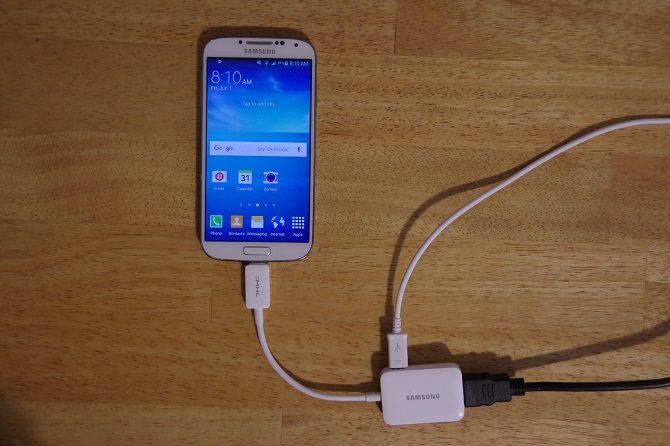
For a USB to TV connection using MHL, first hook up your phone via an MHL adapter. The adapter will require power either from a USB port on the cable or an external source. My Samsung MHL adapter features a micro-USB port on the side for use with nearly any cable. Some cables come with a connector for your phone or tablet and a power source in one unit.


Next, connect your phone to your television with the MHL cable. After that, you should see your phone screen on your TV; it’s plug-and-play. Overall, MHL is one of the best solutions for connecting an Android phone to a TV using a USB cable.
Method 2: Connecting Phone to TV Using SlimPort
Alternatively, you may connect your phone to a TV with a SlimPort cable. Since both MHL and SlimPort are technologies that serve content from mobile devices to displays with a physical connection, they’re similar. Yet SlimPort differs in its outputs.
Whereas MHL is limited to HDMI video output, SlimPort can send signals via HDMI, DVI, DisplayPort, and VGA. As such, it’s better suited to a variety of displays, including older monitors and TVs with VGA but no digital inputs.
Additionally, power supply further distinguishes MHL and SlimPort. Although MHL initially required a power connection, MHL 2.0 makes this non-essential. Still, since MHL does draw power from the mobile device, it’s ideal to connect a power cable. SlimPort, however, does not draw power from mobile devices.
You’ll need the following to connect a phone to your TV using a SlimPort adapter:
- SlimPort-compatible phone (SlimPort’s list of supported devices [No Longer Available])
- A SlimPort cable or adapter
- Video cable (HDMI, DVI, DisplayPort, or VGA)
- Display with HDMI, DVI, DisplayPort, or VGA input
Like using MHL, which SlimPort cable you choose depends on your device.
Begin by plugging the SlimPort adapter into your phone. Then, attach the SlimPort adapter to your display using the proper cable. You should then be able to view your phone’s screen on a TV. Like MHL, it’s plug-and-play.
Method 3: Connecting Tablet to TV Using a USB Cable
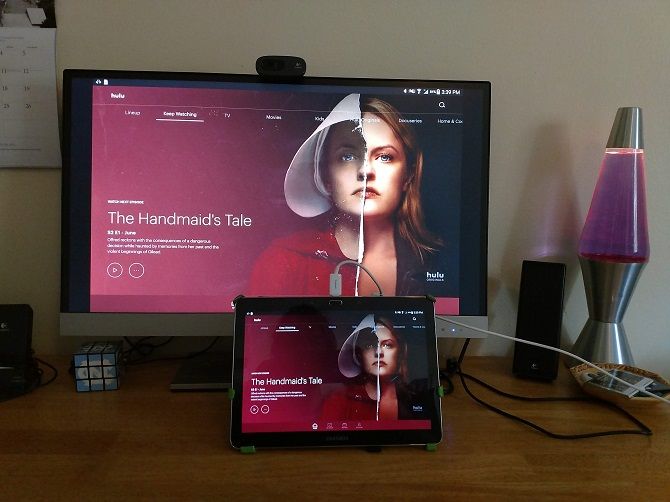
You can connect a tablet (check out the best cheap tablets) to your TV using a USB cable as well. For compatible Android tablets, you’ll use either MHL or SlimPort. The process is identical to hooking up a phone to your TV. Ideally, your phone and tablet will both be compatible with MHL or SlimPort, so you can use one adapter for both devices.
How to Connect an iPhone to TV With USB
Connecting your iPhone to a TV is similar to connecting Android devices, but you’ll need a different cable. This differs based on model.
Nearly everyone will have a modern iOS device (iPhone 5 or newer) outfitted with a Lightning connector. You’ll need either the Lightning digital AV adapter for HDMI outputs, or the Lightning to VGA adapter if you require a VGA connection. iOS devices with the old 30-pin port instead use the 30-pin VGA adapter.
Once you’ve plugged in your adapter, simply hook up the video output to your display. Then, your phone screen will mirror. Apple’s official Lightning adapters contain an additional Lightning port for charging while viewing content on a second screen.
How to Connect an iPad to TV With USB
Like hooking an iPhone to your TV using USB, you can connect an iPad to your TV through the same means. Again, you’ll most likely need a Lightning cable for this. Only the iPad 3 and earlier use a 30-pin cable. All other iPads, including every iPad Mini and iPad Pro, use a Lightning cable.
Additionally, you’ll choose either the digital AV adapter or VGA adapter. Which of these you pick depends on the inputs of your display.
USB to TV: Connecting as a Storage Device

While the most common use case for connecting a phone to a TV using USB is for screen mirroring, there’s another option. Instead of screen mirroring, you can also simply view files like pictures on a TV. However, you’ll need a compatible monitor, TV, or projector.
Of the various USB to TV connection means, this is the easiest. Since it only requires a phone, USB cable, and TV with a USB input, it’s simple to set up. Which specific cable you need depends on your phone.
On an iPhone or iPad, you’ll use a Lightning cable (or 30-pin for older devices). Alternately, Android users need a micro-USB or USB-C cable. The USB cable that came with your phone or tablet should work fine.
USB to TV: Connecting to View Photos
This assumes that your TV or monitor sports a USB input capable displaying files from a connected storage device. First, connect your cable to your phone. Now, connect your phone to the TV by plugging in the standard USB end of the cable into the port on your TV or monitor.
Then, change the input on your TV to USB so you can see it.
On Android, it’s likely you’ll need to change your USB settings to Transfer files or Transfer photos (PTP). To do this, drag down your notifications from the top of the screen when connected, and tap the USB charging this device notification to change it.


I was only able to view my photos using PTP on both my Insignia LED TV and my ZTE Spro 2 projector. Modern Android devices don’t support the USB Mass Storage protocol, so your TV won’t view your device as a true external drive.
Samsung DeX TV Connectivity
Among the most popular Android devices available, you’ll find Samsung flagship handsets. These feature connectivity with televisions and monitors. For pure screen mirroring, you’ll need a USB-C to HDMI cable.
To connect a Samsung Galaxy S8/S8+/Note 8/S9/S9+/Note 9 to your TV, merely hook up a USB-C to HDMI adapter. Plug the USB-C male into the USB-C charging port on your Samsung Galaxy device. Then run the HDMI cable into your TV.
However, Samsung Galaxy S8, S9, and Note 8/9 devices also include DeX. Bridging the gap between mobile and desktop, DeX offers a desktop experience run from your handset
.Since it’s proprietary technology, the method for how to connect your Samsung phone running DeX to a TV differs from standard hookups.
For the entire Galaxy S8 and Note 8 lineup, as well as S9 and S9+, you’ll need a dock to use DeX. The Note 9 doesn’t require a dock. Instead, the Note 9 enters DeX mode with merely a USB-C to HDMI cable. That’s far more useful than a dedicated dock.
Similarly, the Samsung Galaxy Tab S4 can use its DeX desktop mode with merely a USB-C to HDMI cable.
Hook a Samsung Phone Running DeX to Your TV
For Samsung device owners not blessed with a Note 9 or Galaxy Tab S4, you’ll need a few items to connect your Android phone to a TV:
- Compatible Samsung device
- DeX dock
- HDMI cable
- TV/monitor or projector with an HDMI input
Your options for DeX docking stations and cables vary. There’s the original DeX Station which is a round device that sports an HDMI output, Ethernet port, two USB 2.0 ports, and USB-C charging.
The Samsung DeX Pad includes fast charging and a form factor where phones can be kept flat. This means you can use your phone’s touchscreen as a touchpad. Third-party manufacturers such as Rocketek offer DeX docks as well. Then, you’ll find simple cables for DeX which eschew the bulky dock footprint.
Regardless of which option you use, connecting a Samsung device to a TV for use with DeX operates pretty much the same way. First, connect your phone or tablet to a dock or cable via USB-C. Run an HDMI cable from the dock to your screen.
You’ll also need a power cable for powering the dock and charging your device.
Connect Phones, Tablets, and TVs With USB: Success!
While a USB to TV connection varies by device, connection type, and display inputs, it’s thankfully not too difficult to set up. However, don’t forget that wireless casting is usually more convenient. Regardless of whether you’re using an Android, iPhone, or Samsung device running DeX, there’s a way to connect your phone or tablet to a TV for viewing on a larger screen.
Comments
Post a Comment